


Stop Making Users Write the Prompt
November 01, 2026
4 min
The question I hear most often is, “Which AI model should we use?” I understand why people ask, but there is no useful answer without a task, a budget, and a way to measure success.
Model names and benchmark positions change quickly. The decision process changes much more slowly. This is the process I use.
I write down what the system must do before looking at providers. “Build an AI assistant” is too broad. “Extract five fields from an invoice and return valid JSON” is something I can test.
I also separate different jobs. The best model for a complex coding task may be wasteful for classification. A fast model that handles thousands of routine requests may struggle with an unusual case. One application can use more than one model.
In an agent architecture, I still keep model routing separate from tool permissions and workflow controls.
Useful questions are:
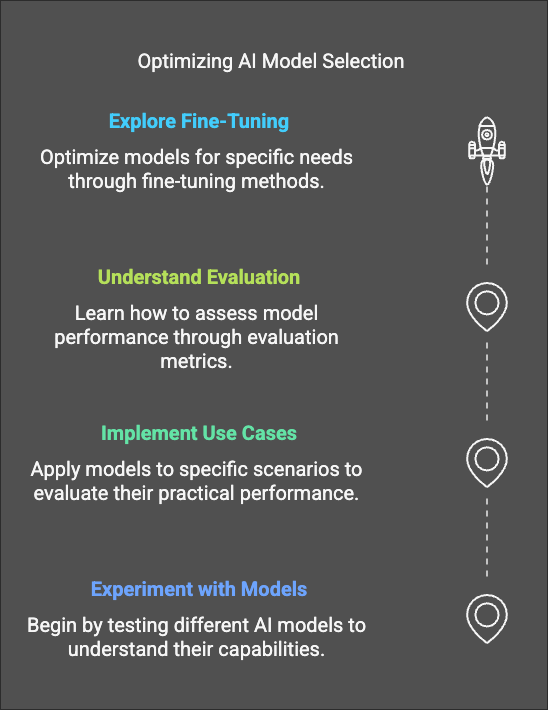
I do not choose from a demo prompt. I collect a small set of real examples, including awkward inputs and known failure cases. For an extraction task, that might be 50 documents with the expected fields. For a support assistant, it might be common questions, ambiguous questions, policy boundaries, and requests the assistant should refuse.
The first evaluation does not need a large platform. A versioned file, a repeatable script, and clear pass criteria are enough to make the decision better than intuition alone.
I measure what the product needs, for example:
Human review is still useful, but I define the review question. “Which answer feels better?” is vague. “Which answer follows the policy and gives the correct next step?” is easier to judge.
A model rarely runs alone. Prompts, retrieval, tools, output validation, retries, and guardrails all affect the result. I compare models inside the same application path so I do not mistake better surrounding code for a better model.
This also exposes an important trade-off: a cheaper model that needs several retries may cost more than a stronger model that succeeds first time.
| Area | What I check |
|---|---|
| Quality | Success rate on the real evaluation set |
| Reliability | Structured output, tool use, and consistency |
| Speed | Median and slow-tail latency, not only the best request |
| Cost | Total cost per successful task, including retries |
| Context | Whether the task truly needs a large context window |
| Operations | Rate limits, regional availability, monitoring, and support |
Sensitive data does not automatically mean self-hosting, and a hosted API does not automatically mean unsafe. I check the actual service terms and configuration: retention, training use, data location, encryption, private networking, access control, and audit logs.
Self-hosted open-weight models give a team more control, but they also transfer responsibility for patching, scaling, model serving, safety controls, and monitoring. That can be the right trade-off when data or deployment requirements demand it. It is not free privacy.
For a new feature, I usually start with a capable hosted model. It gives me a quality baseline quickly. Once the workflow is useful and measured, I test smaller models against the same evaluation set.
Common ways to reduce cost are:
Routing is often more useful than finding one model for everything. A small model can classify the request or handle routine work, while difficult cases move to a stronger model. The router itself needs evaluation; a cheap wrong route is still a failure.
Providers offer stable versions, dated versions, preview releases, and aliases such as “latest”. I prefer a pinned production version and an explicit upgrade process. A moving alias can change behaviour without a code deployment.
For each upgrade, I rerun the evaluation set, compare latency and cost, inspect changed failures, and keep a rollback path. Preview models are useful for experiments, but I do not build a critical workflow around an endpoint with a short or unclear support window.
I choose the least expensive model that meets the quality, safety, latency, and operational requirements on the real task. Not the smallest model at any cost, and not the most capable model by default.
When two models are close, I prefer the one the team can operate with confidence. Clear limits, stable versions, good observability, and a provider relationship often matter more than a small benchmark difference.
The model is a replaceable part of the product. A good evaluation set is what lets the team replace it without guessing.

Legal Stuff