


What an AI Agent Should Remember
November 01, 2026
3 min
A customer asks where their order is. The support agent has the order open, the delivery history beside it and a policy page in another tab. Then they open the company’s AI assistant and start explaining all of that again.
The model may write a good reply. The product has still made the person assemble the task.
This is where my engineering instinct needs a product question: what does the application already know, and why is the user typing it again? A better prompt might improve the answer. A better feature might remove the need to write that prompt at all.
For this example, I would start with Draft a reply, placed beside the selected customer message. The application supplies the authorised order details and the relevant policy. The person supplies anything the system cannot know, such as the tone needed for a particularly difficult conversation.
That is a smaller promise than “Ask me anything”. It is also easier to test. Can a support agent get to a reply they are comfortable sending?
Google’s People + AI Guidebook starts with user needs and the existing workflow, including whether AI adds enough value to justify using it. I like that starting point because a template, a clearer status page or a better search filter might solve part of this problem already.
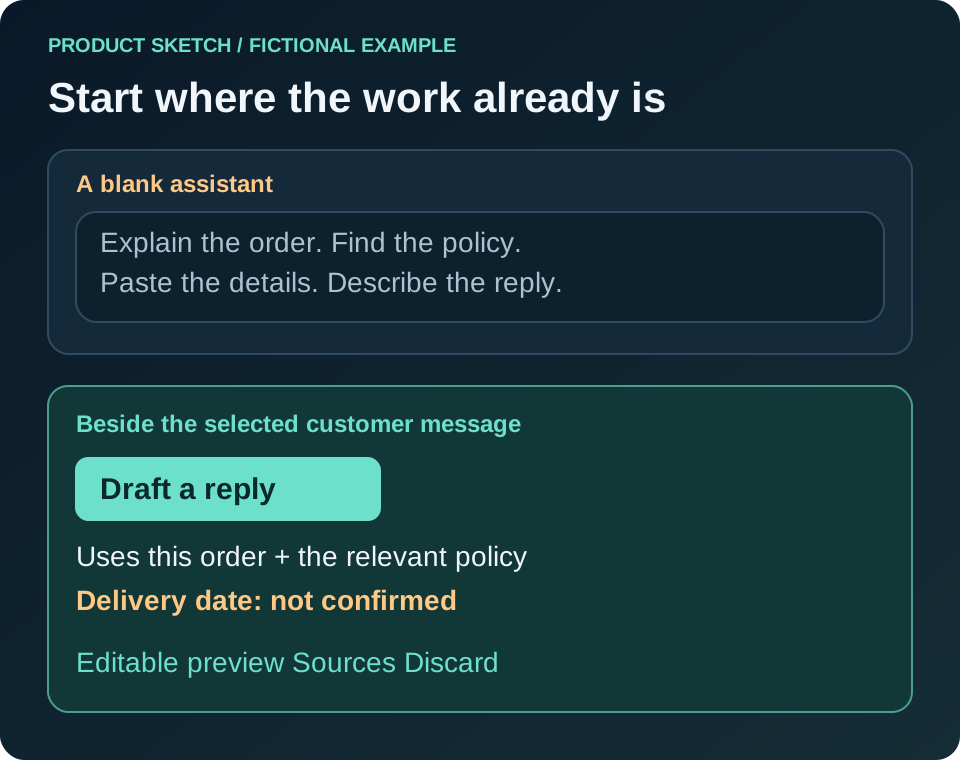
Chat still has a place. It is useful when someone is exploring a problem, asking follow-up questions or trying to do something the interface did not anticipate. I would keep it available without making every familiar task begin there.
Suppose the carrier has not supplied a new delivery date. A polished draft that invents one is worse than a rough draft that shows the gap.
I would put a visible note above the reply: No confirmed delivery date available. Under the draft, I would show the order record and policy section used. Those links give the person a route back to the evidence; they do not prove the generated wording is correct.
The preview needs three ordinary controls: edit, discard and send. Editing the delivery sentence should not require asking the assistant to regenerate the entire reply. Discarding the suggestion should leave the original customer message where it was.
These details deserve design time. Microsoft’s Guidelines for Human-AI Interaction include making capabilities clear, supporting efficient correction and letting people dismiss unwanted suggestions. The research predates today’s assistants, but those interaction problems are still recognisable.
I would also avoid displaying a confidence percentage unless the team can explain what it means and has tested whether it helps this decision. “No carrier estimate found” gives a support agent something to act on. An unexplained “92% confident” does not tell them which sentence to check.
Writing text, preparing a change and making that change are different product decisions.
For a first version, I would let the system prepare the reply while the person sends it. Later, a narrow class of routine messages might be suitable for automatic sending, if there is evidence that the rules, exception handling and monitoring are good enough. That is a separate release decision.
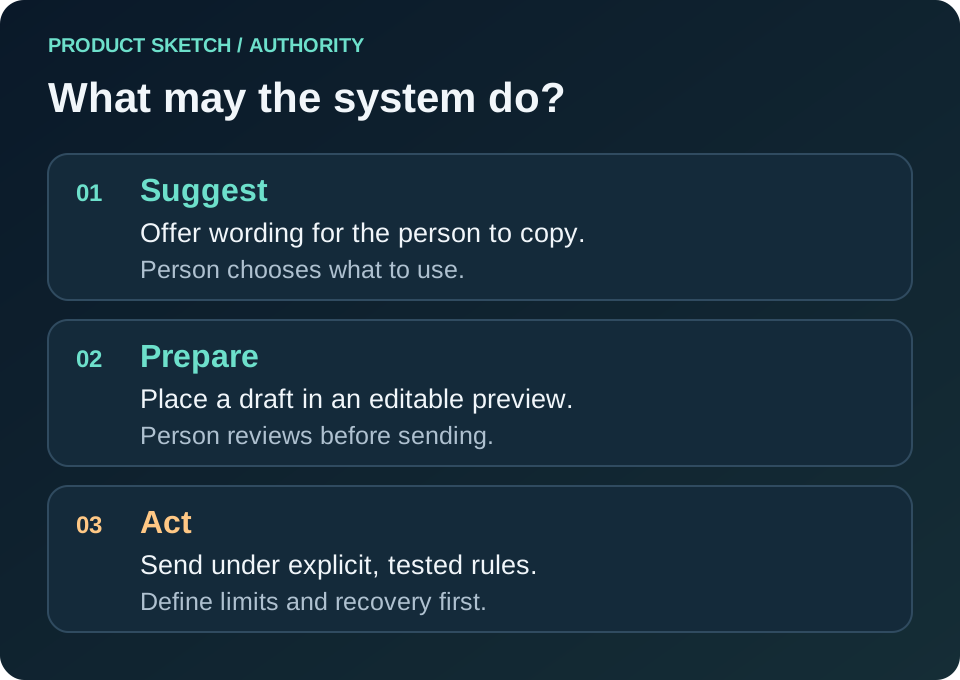
A confirmation dialogue is only useful if it makes the decision clear. Before sending, show the recipient and the final text. Before issuing a refund, show the order, amount and consequence. Repeated vague “Are you sure?” messages would teach people to click through without reading.
Recovery also has limits. A draft can be discarded. A sent email cannot reliably be taken back. I want that difference visible while deciding what the assistant may do.
If someone replaces “Your order will arrive tomorrow” with “We are waiting for a confirmed date”, what happens next?
For this draft, the edit should take effect immediately. Whether it changes future drafts is another question. The team might review corrections, update a prompt or policy rule, or use an approved training process. None of those happens automatically because a text field was edited.
Google’s feedback guidance makes this distinction worth explaining: people need to understand what their feedback influences. I would use specific wording such as “This changes the current reply” rather than “The AI learns from you”.
For the team, I would record the type of correction: wrong fact, missing detail, unsuitable tone or unnecessary reply. That is a more useful discussion than a single average star rating. Keep customer text out of the analysis unless there is a clear need and an appropriate way to handle it.
You can try this with paper screens or a slide deck. No AI account is needed. Ask a few people who handle the task to work through a normal order, a missing delivery estimate and an exception to the policy. Supply the draft yourself so the test stays focused on the interaction.
Watch where they look, what they check and what they change. Do they notice the missing date? Can they find the source? Can they abandon the suggestion and finish the job?
With a working model, I would then measure time to an acceptable reply, factual corrections and abandoned attempts alongside a short review of the final messages. More messages sent to the assistant could mean interest. It could also mean the first answer was difficult to use.
The next feature I sketch will start with one selected object, one useful action and one visible result. If I cannot explain what the user can check and correct, I still have product work to do.

Legal Stuff